Company vehicle tracking app: Dadycar Go
The driver carries out the condition report, books a shared vehicle, checks the documents and receives the alerts that concern them. The manager sees it all come back into Dadycar.
Hosted in the European Union · GDPR · Flotauto 2025 Innovation Award · free up to 50 vehicles, then €6 excl. VAT per vehicle per month
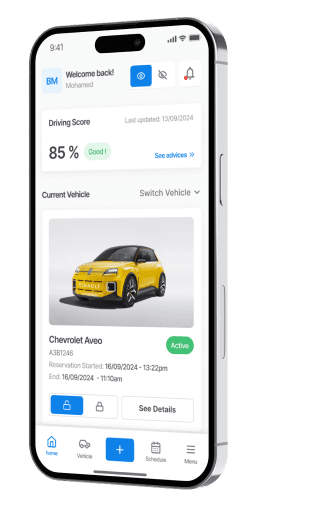
What Dadycar Go changes
- Structured condition reports: inspection forms with items and conditions, submitted from the phone.
- Alerts routed to the driver: the telematics signals that concern them arrive as push notifications.
- Available on iOS and Android, with no device needed for inspections, bookings and documents.
When the driver is the last to know
- The condition report is done on paper, photographed from afar, lost at return.
- The shared vehicle is booked by message, and two people turn up for the same key.
- The warning light comes on during the trip and the manager hears about it back at the depot, three days later.
What you get with Dadycar Go
Dadycar Go is the driver's app. Every action taken there feeds the Inspections, Assignments, Documents and Alerts modules of the platform.
Condition reports and inspections
Automatic inspection forms with items and conditions, for example a monthly 33-point check; every submission joins the vehicle's history.
Car-sharing booking
The driver books a shared vehicle from the app; the booking appears immediately in the manager's assignment schedule, alongside named assignments.
Vehicle documents at hand
Insurance, contract, regulatory documents: the driver consults the papers of the vehicle they drive, up to date and dated, without calling the manager.
Push alerts for the driver
Every telematics signal can be routed to the driver: upcoming service, tyre pressure, engine warning light, according to the manager's settings.
RFID badge and identification
The RFID badge from the employee record identifies the driver when picking up the shared vehicle, with no key handover and no trip to reception.
How it works
- 1Create the employee records. Role, site, RFID badge: every driver receives their access to the app (employee and site management).
- 2Set up forms and alerts. Inspection forms and routing of telematics alerts to the driver, the manager or email.
- 3Let it flow back. Inspections, bookings and alert acknowledgements arrive in the platform and in the dashboard, with no re-entry.
Who it is for
- Corporate car sharing: book, pick up and return a vehicle without going through reception (see the solution page).
- Transport and logistics: a condition report at every shift start, with photos (see the industry page).
- Construction: vans inspected on site, far from the depot (see the industry page).
A live condition report during the demo
We carry out a full inspection from the app, on one of your vehicles, and you see it appear on the vehicle record.
Your questions before getting started
- “Do I need a device?” No for inspections, bookings and documents. Push alerts coming from the vehicle require a GPS-OBD device or a connected vehicle.
- “What if my drivers refuse geolocation?” The app serves the driver first: condition reports, booking, documents. The geolocation rules are described on the trust and security page.
- “How long does it take to start?” Once the employee records are created, each driver installs the app and uses the forms already set up.