 Flotauto 2025 Innovation Award
Fleet geofencing: zones and hours for each site
Geographic zones and time slots that separate working time from the rest, to steer how vehicles are used without watching over people.
Geofencing
Paris head office · Europe/Paris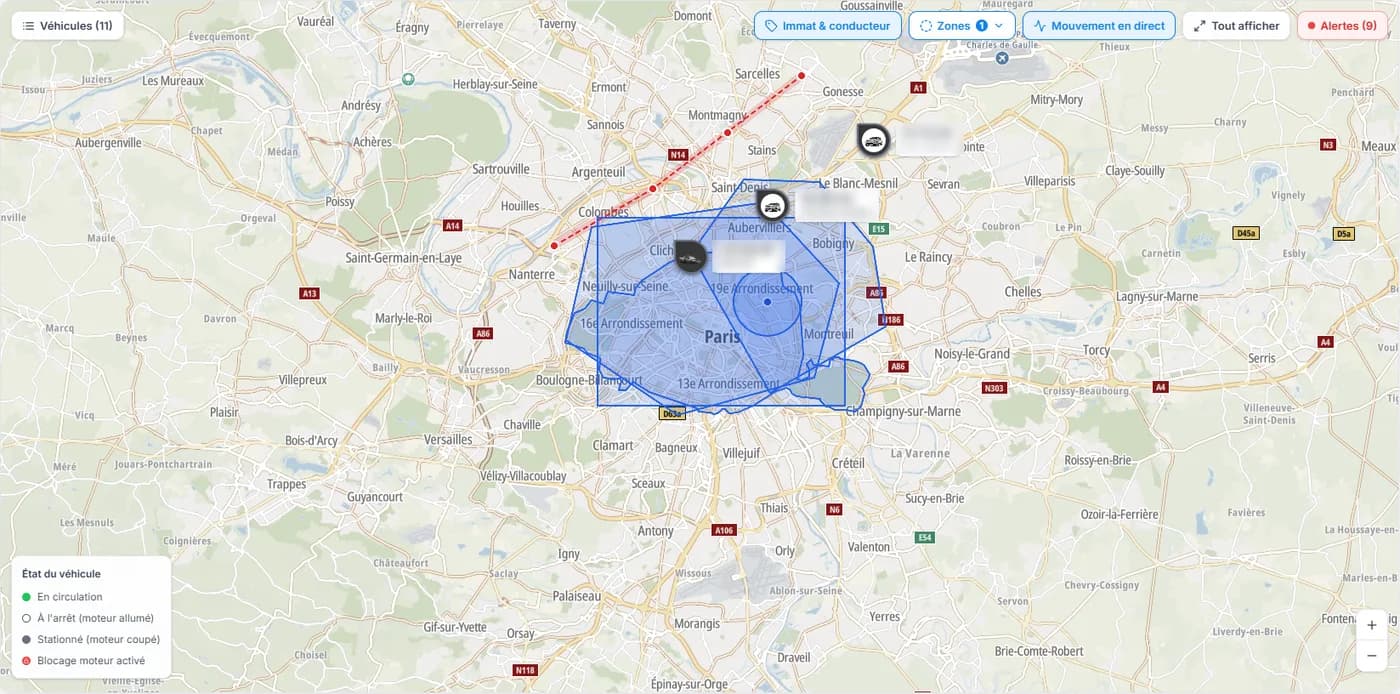 Site zone · Paris head office
Vehicles included: 14
Qualify a journey in the zone
Thursday November 12
- Hosted in France, by OVHcloud
- GDPR
- €6 excl. VAT per vehicle per month, free up to 50 vehicles
The Geofencing module in three facts
Zones and hours combined
Per site and per vehicle group
Lyon branch
Two sources of position
GPS/OBD device
Fitted
Connected OEM
No hardware
What goes wrong without zone rules
Renault Kangoo · Montreuil
Seen on the map Tuesday at 9:40 pm
Business or private trip? No rule to tell.
Branch hours
Paris head office8 am – 6 pm
Lyon branchSaturdays worked
Lisbon branchUTC+0, other holidays
Works council · agenda
Telematics project: opinion postponed, purposes and time slots to be clarified.
A vehicle seen on the map says nothing
Sites do not run to the same rhythm
Permanent monitoring is forbidden and badly received
What you get with Dadycar
Geofencing builds on the position data telematics already reports. You define the rules, the software flags the departures from them.
Geographic zones drawn on the map
Time slots per day
Site vans
Time zones and public holidays
Paris head officeEurope/Paris
Next holiday: Nov 11 · Armistice Day
Lisbon branchEurope/Lisbon
Next holiday: Dec 1 · Restoration of Independence
Brussels branchEurope/Brussels
Next holiday: Nov 11 · Armistice Day
Vehicle groups
Business use told apart from private use
Idle-time-in-zone alerts
Idle time in zone
How it works
A GPS-OBD device or a connected OEM vehicle: the position feeds the real-time map.
Every site receives its time zone, its daily slots and its public holidays; every vehicle group, its own rules.
The signals arrive in the alerts, with severity, threshold and acknowledgment.
Connect a vehicle
Renault Trafic · AB-123-CD
Connected OEM vehicle
No hardware, through the manufacturer.
Compatible brand
GPS/OBD device
Plugged into the diagnostic port.
Data reported
Who it is for
Transport and logistics
Saint-Ouen depot · today
Citroën JumperStopped 58 min
Renault TraficIn at 7:12 am
Iveco DailyIn at 7:40 am
Construction
On site now
Saint-Denis site4 veh.
Villeurbanne site3 veh.
Vénissieux depot6 veh.
Multi-site commercial fleets
Paris head officeMon–Fri 8 am – 6 pm
Lyon branchMon–Sat 7 am – 7 pm
Lisbon branchMon–Fri 9 am – 6 pm, Europe/Lisbon
Your zones, drawn during the demo
Bring two or three of your sites: we set the zones, the time slots and the public holidays live.
Your questions before getting started
“What if my drivers refuse to be located?”
Time slots exist precisely for that: outside working time, collection has no reason to be active, and the employee must be able to switch it off.
“Do I need a device?”
A GPS-OBD device or a connected OEM vehicle: both report the position, the second with no equipment to fit.
“How long does it take to start?”
As soon as vehicles report their position and the sites are created, the first zones can be drawn.
Frequently asked questions
What is geofencing for a vehicle fleet?
Is locating employees' vehicles allowed in France?
Must location tracking be switched off outside working hours?
How should employees be informed before a tracking device is fitted?
How long can a vehicle's location data be kept?
Can a business trip be told apart from a private one?
See Dadycar on your own fleet
- Hosted in France, by OVHcloud
- GDPR
- Flotauto 2025 Innovation Award
- €6 excl. VAT per vehicle per month, free up to 50 vehicles