Fleet telematics: your vehicles in real time
Every vehicle located, every trip recorded, every engine signal reported: with a GPS/OBD device, or with no device at all on connected OEM vehicles.
Hosted in the European Union · GDPR · Flotauto 2025 Innovation Award · free up to 50 vehicles, then €6 excl. VAT per vehicle per month
Dadycar telematics in three facts
- Two ways to connect: a GPS/OBD device fitted in the vehicle, or a connected OEM vehicle with no hardware at all.
- Around forty OBD/CAN signals reported, each with its own configurable threshold.
- Four vehicle states on the map: driving, stopped with the engine running, parked, engine immobilisation active.
Without telematics, the fleet is guesswork
- Where are the vehicles? The answer comes from calling the driver, or not at all.
- Mileage arrives late, read by hand, often wrong, and servicing deadlines slip.
- An engine warning light or a low tyre pressure is only seen at the garage, once the breakdown has already cost a day.
What you get with Dadycar telematics
The principle: vehicle data flows into the fleet management software on its own, with no data entry and no spreadsheet in between.
Real-time location
A map of the fleet showing the state of each vehicle: driving, stopped with the engine running, parked or immobilised, along with its open alerts.
Trips per vehicle
The trip history of every connected vehicle, by device or by OEM, available from the vehicle record.
Odometer history
Telematics readings feed the real mileage; manual readings remain available for vehicles that are not connected.
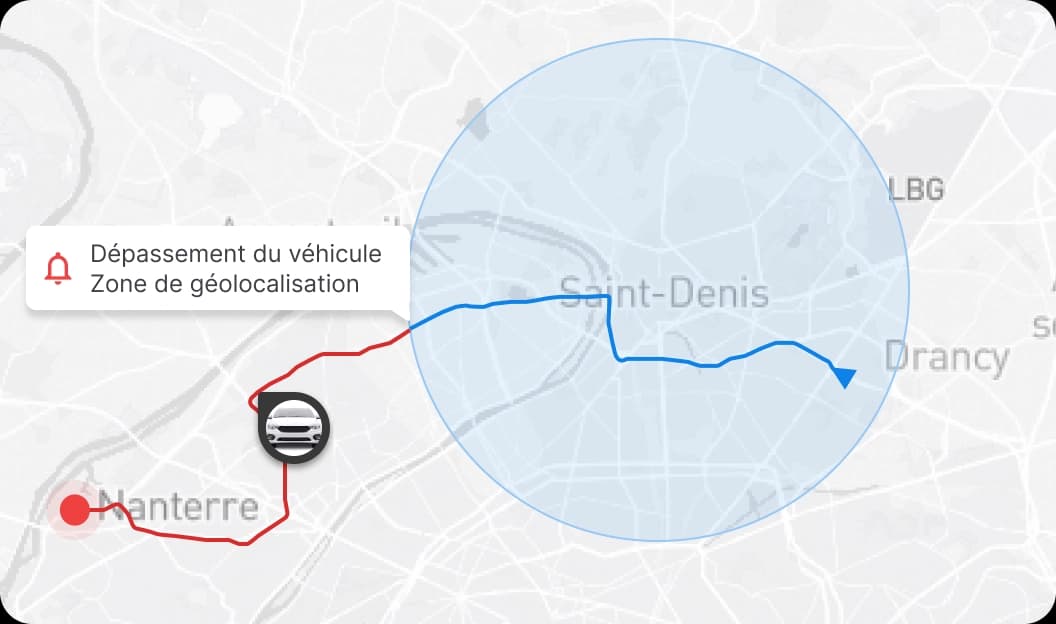
Geofencing with time slots
Geographic zones and time slots set per site and per vehicle group, public holidays included: the basis for business and private use rules.
Configurable telematics alerts
12 V battery, engine warning light, fault codes, temperatures, impact, fuel theft, tyre pressure per wheel: each signal has its severity, its threshold and its recipient.
Remote engine immobilisation
In case of theft or unauthorised use, engine immobilisation is triggered from the software and appears as a vehicle state on the map.
How it works
- 1Connect your vehicles. A GPS/OBD device plugged into the diagnostic port, or activation with no device for the compatible brands listed on the connected OEM vehicles page.
- 2Set zones, time slots and thresholds. Geofencing per site and per group, a threshold per signal, alerts routed to the driver, the manager or an email summary.
- 3Manage from the dashboard. The telematics tab of the dashboard brings together location, open alerts and odometer readings; anomalies go to the alerts module.
Who it is for
- Transport and logistics: knowing where the vehicles are and anticipating the breakdowns that stop a round (see the industry page).
- Construction: vehicles and vans spread across sites, with zones and time slots per site (see the industry page).
- Fleet managers: real mileage for contracts, servicing and reports (see the role page).
Your vehicles on the map, during the demo
A 30-minute demo on your own fleet: together we check which vehicles connect without a device and which ones need one.
Your questions before getting started
- “Do I need a device?” Not always: compatible connected OEM vehicles report their data with no hardware; the others get a GPS/OBD device.
- “What if my drivers refuse geolocation?” Time-based geofencing per site and per group separates working time from private time, in line with the CNIL guidance detailed in the FAQ.
- “Do I have to switch everything on?” No. Telematics is a pillar of its own; fleet management works on its own, with no hardware.